
How to Scale Data Validation Without Thousands of Database Queries
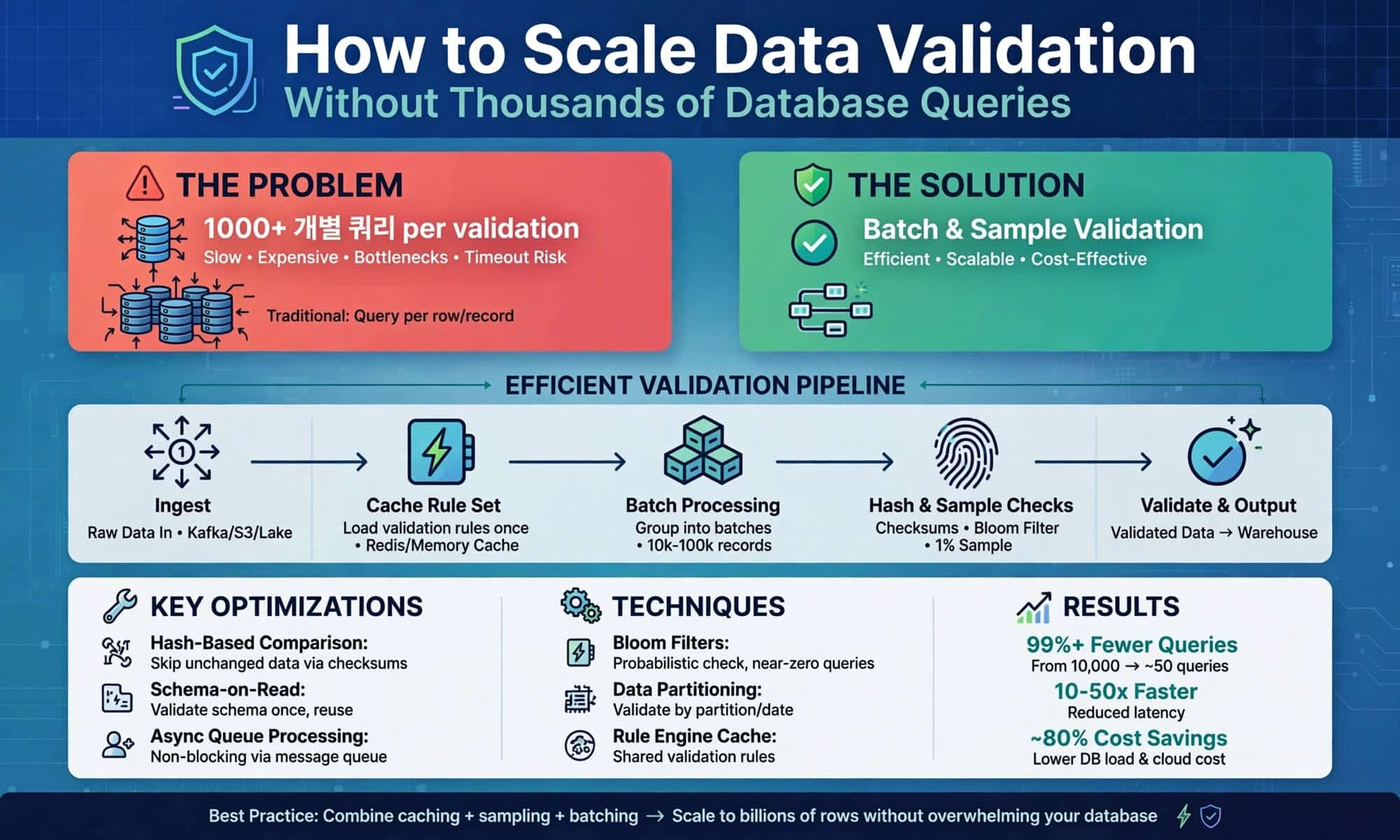
Many data validation workflows begin with a simple pattern: retrieve an entity’s data, evaluate a business rule, store the result, and repeat.
This approach may work well for a small number of entities, but it becomes increasingly inefficient as the workload grows to tens or hundreds of thousands of records.
With 10,000 entities to be evaluated, a query per entity design can generate about 10,000 database requests. Even when individual queries execute efficiently, repeated database round trips, network communication, and application-level processing can accumulate significant overhead.
Once you have that, optimization of queries is only a part of the solution.
The greater opportunity is to break away from the mentality of using a single entity as a single database operation.
The Query-Per-Entity Problem
Consider a simplified query-per-entity processing pattern:
for each entity_id in entity_ids:
cursor.execute(
“””
SELECT event_date, status
FROM activity_records
WHERE entity_id = ?
“””,
entity_id
)
rows = cursor.fetchall()
result = evaluate_rule(rows)
The code is easy to follow as it goes through the business process, one entity at a time.
But from the standpoint of architecture, each one needs another interaction with the database.
With an increasing population, the number of interactions in the database increases.
An entity can be a customer, an account, an employee, a device, a location, a transaction group, or any other business entity. The underlying scalability problem is straightforward:
10,000 entities does NOT have to imply 10,000 database queries.
Figure 1. Query-Per-Entity vs. Batch Processing
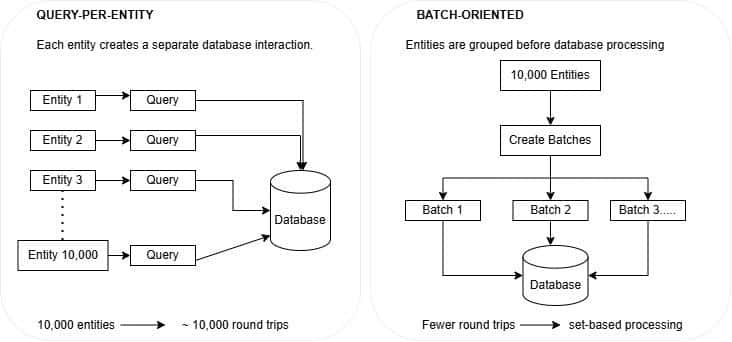
Figure 1. Batch-oriented processing minimizes repetitive interactions of application-to-database by fetching and processing groups of entities at once.
1. Change the Unit of Database Work
Optimization is an architectural optimization, not syntactical.
Ask a question about a population rather than a question for each entity in the database.
One of the simpler patterns could be:
SELECT
entity_id,
event_date,
status
FROM activity_records
WHERE entity_id IN (
/* IDs of the current batch */
);
The application can break a large population into reasonable batches, and fetch the records to the necessary groups.
Processing model changes from
These are the four steps of the planning process.
The processing model changes from:
Query → Evaluate → Query → Evaluate → Repeat
to:
Select Batch → Retrieve Data → Evaluate Population → Store Results → Next Batch
The choice of batch size should be made carefully. Very small batches have significant amount of the original round-trip overhead while extremely large batches can lead to very large queries or memory pressure.
The goal is not to maximize batch size, but to reduce database interactions while keeping each unit of work manageable.
The aim is to reduce the number of times you need to interact with the database and to ensure that each unit of work is manageable.
2. Move Population Logic Into Set-Based Operations
Once records are retrieved in batches, many validation operations can be performed across the entire population using set-based SQL.
For example, suppose a validation rule requires identifying the most recent event for each entity.
One application might traverse all the records of each entity. SQL can perform the ranking in just one operation:
WITH ranked_activity AS (
SELECT
entity_id,
event_date,
status,
ROW_NUMBER() OVER (
PARTITION BY entity_id
ORDER BY event_date DESC, event_id DESC
) AS rn
FROM activity_records
)
SELECT
entity_id,
event_date,
status
FROM ranked_activity
WHERE rn = 1;
This is the same for other operations like counts, rankings, aggregates, duplicates or historical sequences.
Not all business rules have to be in SQL. Complex decision logic might still be easier to maintain in application code.
The crucial question is:
What portions of the work are inherently population-based and what portions are actually entity-based application logic?
That delineation helps to keep application loops from becoming the standard processing architecture.
3. Re-evaluate Only Affected Entities.
While batching helps to minimize the number of database calls, there might be another source of unnecessary work.
The same validation process can recalculate each entity each execution, even if most of the entities have not changed.
Consider a system with 100,000 entities, where only 2,500 have been added or modified since the last successful validation run.
If the source has reliable metadata about how the content has been modified, the affected population can be determined first:
SELECT DISTINCT entity_id
FROM activity_records
WHERE updated_at > @LastSuccessfulRun;
Only these entities then go through the validation process.
The workflow becomes:
Detect Changes → Identify Affected Entities → Batch → Evaluate → Update Results
This makes an important point.
Batching minimizes the number of database operations.
In the case of change detection, the number of entities to be evaluated is reduced.
When used together, they cover two areas of unneeded processing.
Selective re-evaluation must also account for late-arriving records, deleted records, and rules whose outcomes can change over time or due to external dependencies. It should therefore only be used where the condition of a rule is known.
4. Avoid Turning Result Storage Into Another Row-by-Row Problem
When finding data and writing out results one at a time, the problem can be shifted to a different area in the process.
A pattern such as:
for result in results:
insert_result(result)
may cause another long chain of database transactions.
If supported, the results may be written through bulk inserts, a staging table or a set-based update pattern.
A common processing pattern is:
Evaluate Batch → Stage Results → Set-Based INSERT/UPDATE → Commit
This is especially helpful if previously obtained results have to be updated as new results are added.
The takeaway is that scalability must be thought about for the entire pattern of database interactions.
Optimizing data retrieval provides only a partial improvement if the workflow still performs thousands of individual database writes.
5. Design Batches as Recoverable Units of Work
Another benefit of batching is that there are natural recovery boundaries.
A workload of 100,000 entities can be divided into smaller batches, allowing failed batches to be retried without restarting the entire validation process.
Each batch can be assigned a unique identifier and processing status:
Pending → Processing → Completed / Failed
The failed batch may then be investigated independently and even retried.
It should also be possible to safely reprocess it where possible. Reprocessing should be idempotent, meaning that retrying a batch does not create duplicate results or corrupt previously completed work.
This is especially critical when automated validation is integrated into a scheduled production process as opposed to being performed by an analyst running the script.
6. Measure the Entire Processing Workflow
Measuring individual query execution time is not enough to evaluate the performance of an entire validation workflow.
Execution time is helpful but not all the story of performance.
A query that executes in 50 milliseconds may appear efficient. However, executing that query 10,000 times represents 500 seconds of cumulative query execution time, even before accounting for other processing overhead.
The actual action of the overall validation run should therefore be monitored.
Useful measures include:
Number of entities assessed;
Number of queries to the database;
rows retrieved;
The number and size of batches;
total execution time;
Attempts to connect to the database; and
The number of results added/updated.
One easy method of operational visibility is a run log:
INSERT INTO process_log
(
run_id,
started_at,
entities_processed,
database_calls,
process_status
)
VALUES
(
@RunId,
@StartedAt,
@EntityCount,
@DatabaseCallCount,
@Status
);
These are some of the ways to identify a slow query and an inefficient processing pattern.
A validation workflow that becomes slower as data volume grows may not need faster individual queries. It may need fewer database interactions.
A Set-Based Validation Architecture
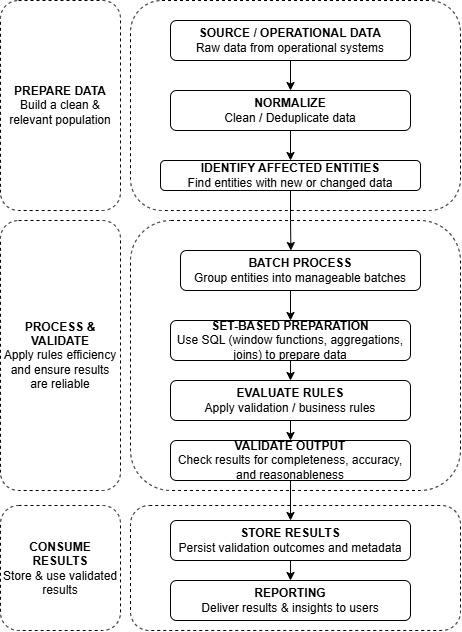
Figure 2. A scalable validation architecture can help minimize any superfluous database interactions at the retrieval and result-storage phases and stay recoverable units of work.
This architecture poses four questions that are practical:
Who is to be assessed?
How many database queries does it take to get their data?
What calculations are possible over the set of the population?
Is it possible to store results without going through the rows of the table again?
Those questions take the focus from optimization of individual SQL statements, into the architecture around those SQL statements.
Eliminate Unnecessary Work Before Optimizing It
The typical countermeasure for a data validation process that slows down is to tune your queries, add indexes, allocate more memory, or allocate more compute.
Those techniques might be helpful.
However, they should not detract from a more basic question:
Could thousands of individual database operations be replaced with a smaller number of batch-oriented or set-based operations?
Use batch population rather than single entity queries. Utilize set based SQL (WHERE) when the logic makes sense for sets of records. Determine what entities need to be recalculated. Record results in bulk if possible. Make batches recoverable. Observe database interactions throughout the whole processing cycle.
It is not always the best optimization to make each query faster.
The most effective optimization may be eliminating thousands of queries that never needed to exist.
About the Author: The post is by Praparna Moharana, a Data Analytics Professional specializing in data engineering, reporting automation, data quality, and scalable data processing. Her work focuses on building reliable data pipelines, optimizing database workflows, and improving enterprise analytics using SQL, Python, and Power BI.
Related Posts

From AI Coding Assistants to Autonomous Agents: A New Governance Model
October 28, 2026An artificial intelligence (AI) agent is given a straightforward objective: fix a ...

9 Best Tools for Building an AI-Powered Software Factory
October 27, 2026Most software factory advice reads as a shopping list. Pick a platform ...

The Increasing Role of LLM Customization as an Essential Aspect of Business AI
October 26, 2026Almost all companies have used a standard, "off-the-shelf" chatbot by this point. ...

7 Agentic Operations Platforms Every Platform Engineer Should Know
October 16, 2026Key Takeaways The model is the smaller part of the problem. Context, memory, ...

Model Disagreement Is a Data Signal: What Cross-Model Agreement Rates Reveal About AI Output Reliability
October 6, 2026No data team would load an unvalidated table into a production warehouse. ...
Leave a Reply